Digital dental chart
A digital odontogram
you read at a glance
The state of every tooth, the treatment plan and completed treatment are on one screen, in the patient’s chart.
- FDI numbering
- Permanent and primary teeth
- Five surfaces per tooth
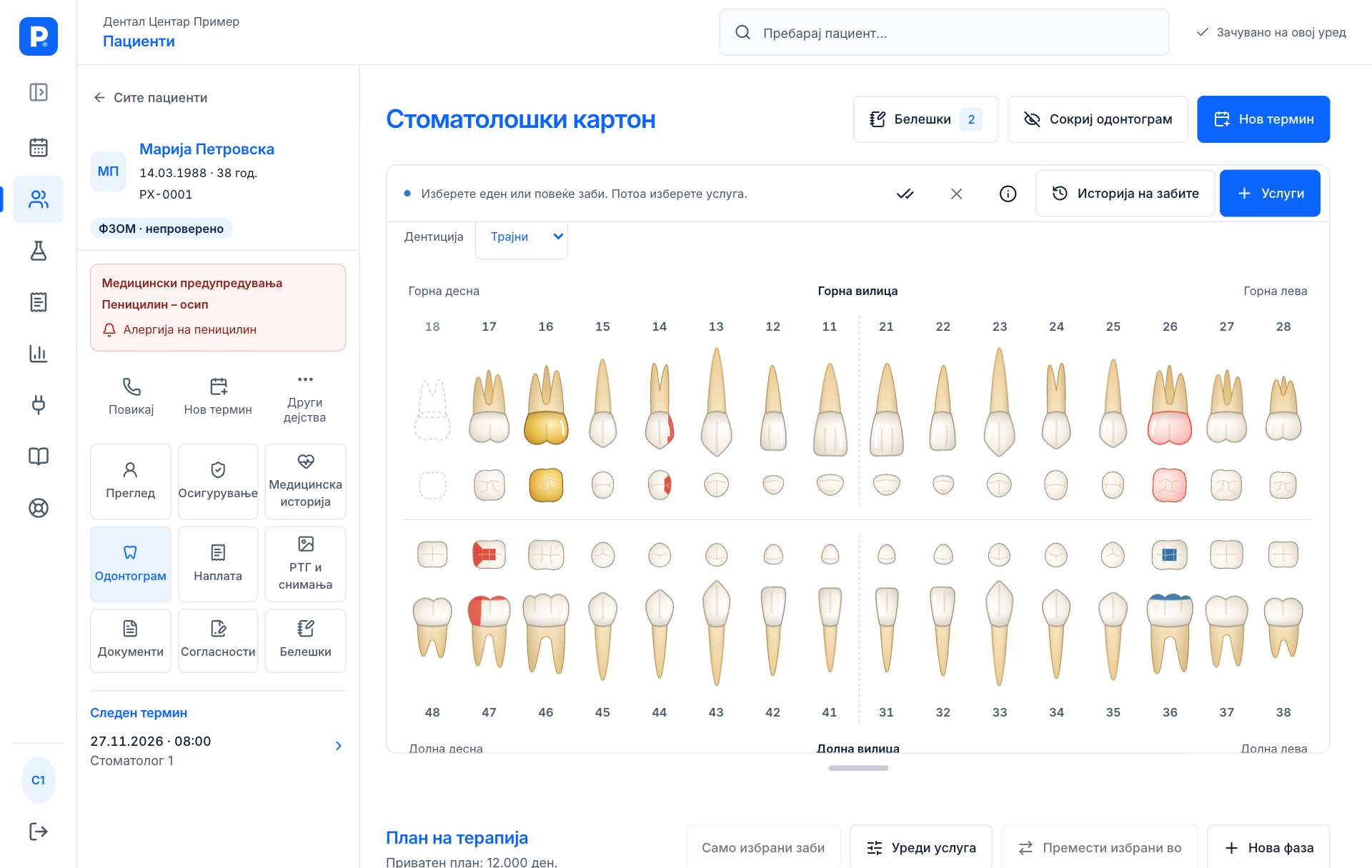
What you record in the chart
Tooth status
Existing restorations are blue, crowns gold and planned treatment red.
Treatment plan
Pick the tooth and surface, add a service from your own price list and the total is calculated.
Periodontal probing
Pocket depths are entered per tooth, directly in the chart, when needed.
Warnings
Allergies and illnesses appear in red as soon as the chart opens.
From examination to printed plan
Open the chart
Warnings and the next appointment are visible at once.
Mark the status
Choose tooth, surface and condition.
Plan treatment
Your practice sets its own services and prices.
Print
The plan carries your logo and prices (Pro and Max).
Which numbering is used?
FDI: 11–48 for permanent and 51–85 for primary teeth.
Can a chart be deleted by accident?
No. Charts are archived, not deleted. Every change stays on record.
Can X-rays be stored?
Storing images on the server is being introduced. Tell us on the call if you need it.
See the odontogram with your own services
Leave your contact, we call you, show you the program and open your account. No card.
Try free for 30 days